DtsBuddy and Pwmx, two libraries for runtime overlays and PWM channels from Elixir
I’m happy to have released on Hex two helper libraries for Nerves projects :
- DtsBuddy helps you diagnose, compile and load device tree overlays at runtime
- Pwmx gives you an ergonomic API over sysfs hardware PWM channels
Library usage in 30 seconds
Here is a sneak peek at how both can be used together in a fresh Nerves remote console. First, load DtsBuddy, use it to enable overlays, and compile and load a device tree overlay :
import DtsBuddy.Sigil # loads the ~DTS sigil
DtsBuddy.enable_overlays() # mounts linux's configFS directory
DtsBuddy.overlays_enabled?() # returns true after enabling if your system supports configfs

compiled_dts = ~DTS"""
  /dts-v1/;
  /plugin/;
  &{/soc/pinctrl@2000000} {
    pwm7_pb10: pwm7-pb10 { pins = "PB10"; function = "pwm7"; };
  };
  &{/soc/pwm@2000c00} {
    pinctrl-names = "default";
    pinctrl-0 = <&pwm7_pb10>;
    status = "okay";
  };
"""pwm7ch # a sample overlay muxing a pin on my mangopi
# it will be named "pwm7ch" in configfs
DtsBuddy.load(compiled) # loads it through configfs
DtsBuddy.status("pwm7ch") # returns :applied
The PWM channel now being available, we can use Pwmx to control it :
Pwmx.list_available_outputs() # [{"pwmchip0, 7}]
{:ok, pid} = Pwmx.Output.start_link({"pwmchip0, 7}) # actually exports the pin
pid |> Pwmx.Output.set_period(500_000, :us)
  |> Pwmx.Output.set_duty_cycle_absolute(250_000, :us)
  |> Pwmx.Output.enable()
Both libraries are very simple but will free your codebase of configfs/sysfs path wrangling and provide nicer ergonomics.
A bit of benchmarking on the mangopi showed me that :
- Writing a period/duty cycle change from elixir takes an average of 4100us, so can be driven at ~24Hz
- Reading a period/duty cycle from elixir value takes an average of 2700us
This is by using direct File.write! operations on sysfs (which pwmx does).
And writing both period and duty cycle takes around 8200us, so it can be driven at ~12Hz
So, this isn’t fast enough at all for robotics, but it is fast enough for a lot of applications and can even provide a low-resolution acceleration curve. For example, I will be able to remove a microcontroller that was between the board and motors on a three-axis motorized table for an interferometry rig.
A bit of risc-v lore
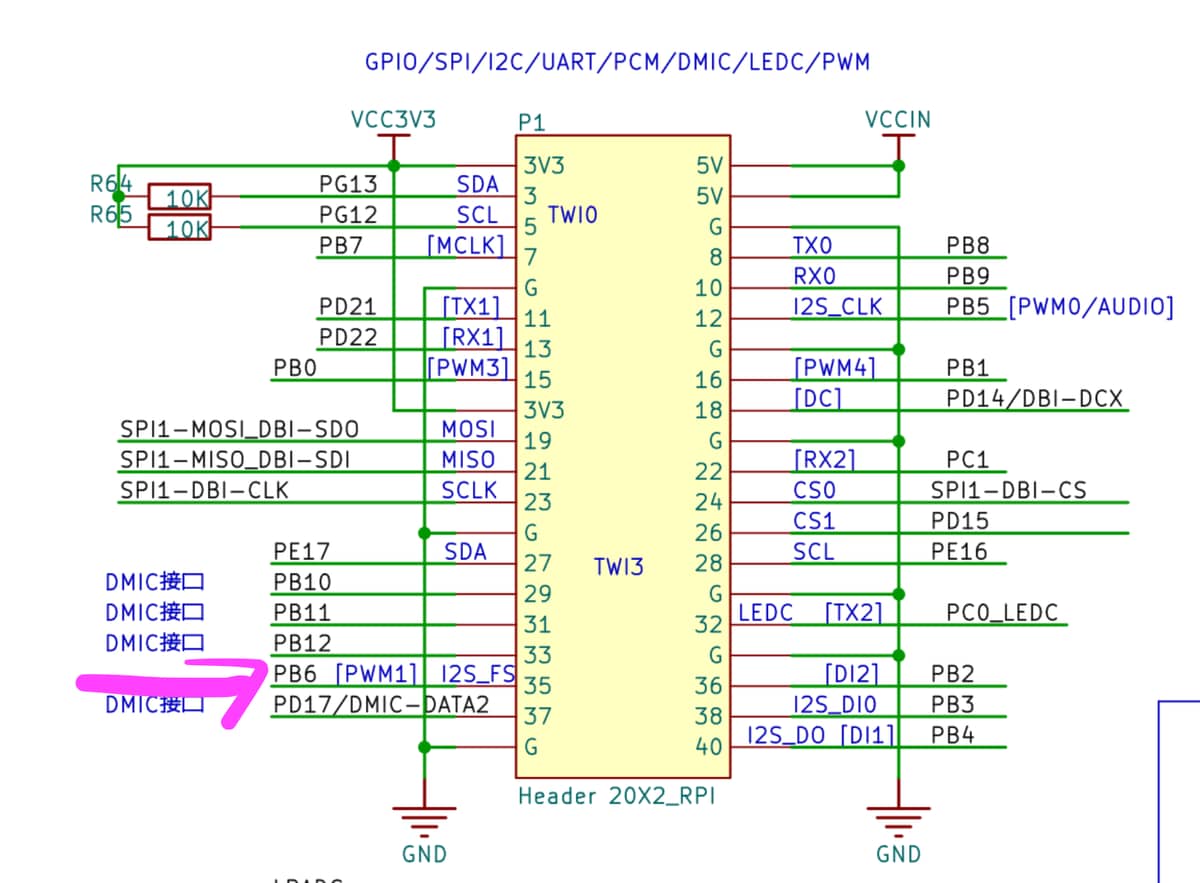
I started them in 2024 but hit a blocker on actually configuring the mangopi’s pinmux controller to export the PWM channels on the physical header, and felt back to another board, despite the D1’s manual (1300+ pages :p) containing the actual data about which CPU registers to write to get the pins out, this needed a sun20i-pwm linux driver to be written. Now, it has : https://lore.kernel.org/all/20250427142500.151925-1-privatesub2@gmail.com/
Fast-forward two years, and the RISC-V situation on linux has improved quite a bit. I updated nerves_system_mangopi_mq_pro (merged in the official system) to get off the kernel fork it was on, and upgrade to linux 6.18.36 from 6.1. But the Allwinner D1’s pwm driver still wasn’t mainlined. I have a fork of the system here with the necessary patches : https://github.com/Lucassifoni/nerves_system_mangopi_mq_pro/tree/pwm-ability , and 7 of the 8 hardware PWM channels now work.
The full overlay that enabled me to get the 7 channels out is the following, if you happen to have a MangoPi MQ Pro and this problem. Note that this needed to drop a leds node in the dto, with this uboot patch : https://github.com/Lucassifoni/nerves_system_mangopi_mq_pro/blob/pwm-ability/uboot/0001-mangopi-enable-leds-spi-and-i2c0.patch
~DTS"""
 /dts-v1/;
 /plugin/;
 &{/soc/pinctrl@2000000} {
   pwm0_pb5:  pwm0-pb5  { pins = "PB5";  function = "pwm0"; };
   pwm1_pb6:  pwm1-pb6  { pins = "PB6";  function = "pwm1"; };
   pwm2_pb11: pwm2-pb11 { pins = "PB11"; function = "pwm2"; };
   pwm3_pb0:  pwm3-pb0  { pins = "PB0";  function = "pwm3"; };
   pwm4_pb1:  pwm4-pb1  { pins = "PB1";  function = "pwm4"; };
   pwm5_pd21: pwm5-pd21 { pins = "PD21"; function = "pwm5"; };
   pwm7_pb10: pwm7-pb10 { pins = "PB10"; function = "pwm7"; };
 };
 &{/soc/pwm@2000c00} {
   pinctrl-names = "default";
   pinctrl-0 = <&pwm0_pb5>, <&pwm1_pb6>, <&pwm2_pb11>, <&pwm3_pb0>,
               <&pwm4_pb1>, <&pwm5_pd21>, <&pwm7_pb10>;
   status = "okay";
 };
 """pwm7ch
Thanks to F. Hunleth and C. Rigby from the Nerves team for pointing me in the right direction a while ago on ElixirForum : https://forum.elixirforum.com/t/configuring-pwm-channel-outputs-on-the-allwinner-d1-mangopi-mq-pro/61814/10